 pour toute question (ou erreur) sur un article.
Calcul manuel des signatures dans SSH
Cet article complète la signature-based authentication appliquée à SSH.
Nous vérifions, par le calcul, les signatures envoyées par le serveur et le client, utilisées pour l'authentification par clé publique entre eux.
L'exercice se voulant bas niveau, il ne faut donc pas craindre ici la manipulation d'octets.
Lab en place
Côté client
Je m'appuie sur Paramiko, une implémentation Python d'un client SSH qui rend plus pratique la compréhension et la modification du code, comparé à une implémentation C comme OpenSSH qui demanderait une recompilation.
Ce bout de code permet au client de se connecter par clé publique (par signature) au serveur :
    from paramiko import SSHClient
    from paramiko.util import log_to_file

    log_to_file("paramiko.log")
    client = SSHClient()
    client.load_system_host_keys()
    client.connect(
        "192.168.122.254",
        key_filename="id_rsa",
        allow_agent=False,
        username="brindereseau",
    )
    client.close()
load_system_host_keys
permet de charger les clés publiques déjà acceptées par le client (lecture du fichier known_hosts).
J'ai auparavant généré une paire de clés RSA de 2048 bits avec l'utilitaire d'OpenSSH :
    $ ssh-keygen -t rsa -b 2048 -C "lab@brindereseau.fr" -f ./id_rsa
    Generating public/private rsa key pair.
    Enter passphrase (empty for no passphrase):
    Enter same passphrase again:
    Your identification has been saved in ./id_rsa
    Your public key has been saved in ./id_rsa.pub
    The key fingerprint is:
    SHA256:KadaOn9/GemfoiZg6xYZARI5uMLF++NXIR+tS8+XHjQ lab@brindereseau.fr
    The key's randomart image is:
    +---[RSA 2048]----+
    | .+o..           |
    |. o+  .          |
    |.....  .  .      |
    |o. .  .. + .     |
    |.   . .oS +  E   |
    |     o=+ =  + .  |
    |    ..++o +. +.  |
    |    .=o.o..o=o.. |
    |    o=+. +ooo+o  |
    +----[SHA256]-----+
Cela a engendré la création du fichier id_rsa.pub :
ssh-rsa AAAAB3NzaC1yc2EAAAADAQABAAABAQDhZQ55ImnypiQ+kz6OXyQp/kPqBSFlP2IionTvRwGsbDtqXqSC1lxdocmsr+IYcmqqfhNbeK/WyWDmWxN6PDw3/88K7xtrLXhEXoVc3A+szj/Y+ZGjkrZmhuLQKfSVqLXgzcZaTTZ2O4RUHsf7zcgl4vdpKPR/tvDMcw7mVhpDJmnD16yNcDjy7lcU140df2tjEsuGb3Rxo2t601nHJuWHEkBRUXidiaqa9vgBzkwGcEUvHbQwu1IrPTd2/sYS4TpaMIYprOgJAQ4RPg10VHG2VJQ8IdHGV8wBCQ7nXz/Goo6Evz+CKyzgn1jGnTvpkF44tkNc+u6V9cvRUjqAnPZ1 lab@brindereseau.fr
Ainsi que la création du fichier id_rsa qui contient la clé privée :
    $ cat id_rsa
    -----BEGIN OPENSSH PRIVATE KEY-----
    b3BlbnNzaC1rZXktdjEAAAAABG5vbmUAAAAEbm9uZQAAAAAAAAABAAABFwAAAAdzc2gtcn
    NhAAAAAwEAAQAAAQEA4WUOeSJp8qYkPpM+jl8kKf5D6gUhZT9iIqJ070cBrGw7al6kgtZc
    XaHJrK/iGHJqqn4TW3iv1slg5lsTejw8N//PCu8bay14RF6FXNwPrM4/2PmRo5K2Zobi0C
    n0lai14M3GWk02djuEVB7H+83IJeL3aSj0f7bwzHMO5lYaQyZpw9esjXA48u5XFNeNHX9r
    YxLLhm90caNretNZxyblhxJAUVF4nYmqmvb4Ac5MBnBFLx20MLtSKz03dv7GEuE6WjCGKa
    zoCQEOET4NdFRxtlSUPCHRxlfMAQkO518/xqKOhL8/giss4J9Yxp076ZBeOLZDXPrulfXL
    0VI6gJz2dQAAA9C82AF1vNgBdQAAAAdzc2gtcnNhAAABAQDhZQ55ImnypiQ+kz6OXyQp/k
    PqBSFlP2IionTvRwGsbDtqXqSC1lxdocmsr+IYcmqqfhNbeK/WyWDmWxN6PDw3/88K7xtr
    LXhEXoVc3A+szj/Y+ZGjkrZmhuLQKfSVqLXgzcZaTTZ2O4RUHsf7zcgl4vdpKPR/tvDMcw
    7mVhpDJmnD16yNcDjy7lcU140df2tjEsuGb3Rxo2t601nHJuWHEkBRUXidiaqa9vgBzkwG
    cEUvHbQwu1IrPTd2/sYS4TpaMIYprOgJAQ4RPg10VHG2VJQ8IdHGV8wBCQ7nXz/Goo6Evz
    +CKyzgn1jGnTvpkF44tkNc+u6V9cvRUjqAnPZ1AAAAAwEAAQAAAQAg4Lyae2Rgfo8xaIma
    u3KbRIl0EMEFE5iVTETJ5X3vQI9vLfSJ2Ep7Zv7z12kf30rDaWYZ9PITXucpWvYtoa04Dv
    LM2cGSYfzV3kLOX5RSxPgnxonRxjQgowLhUglpLkWvj9yj7fjoiLh+C8popuUP77pexthZ
    a95WuF7fRwaILkNhzzGGhpCZMsdh88o3K+hK5yhV1a6nx8nrJ++E7AGbSV7IxKF3liVhMZ
    f4UTJ7XmZsUYKFnTcxnGjAwyFZl0nVPXWkccWZ1wEG9IdSvD1wky8GBDgkBYV22hzuEPHq
    jIcPHUaEKMZLu13VfGZm963uqSJcKCtX8ps3//+ZXJBJAAAAgQC0WIC1zlRlphz1fRkb30
    39KAtKeMYCncp35FHYTrWpMLhZuCmfpI1pBlus3tbNjeM4QmWb1wGG+fC46ZG6JfH4591Z
    GRYxY2p3As2LSgkCCahonB3AeNA+pRTYgnUuE3ZBchZ5+5bzbXQQJLiEHlT3ItfuZxbvpm
    K1Yc+hZEJAYwAAAIEA5lt7dO2U4nsusWLbRQ8g4leT93yRfPZvIoZf3JaJ20HcCGDme3j4
    oRuK8IqB4wEJgCTlRDq4bwweEjpc3P4dIdE375MssaWyLZ78vaR5QnUDwCr5L0zqnF84Xo
    Ts6xeOz8sPDvhvyBIjqzwij0sxveF/jVYo1hPRGXX1FPwlMqkAAACBAPp8J4+YFqZZWCvW
    kwQBUxu+umzVLB1ZAk9ljk9lIFK4OlxT+I5drSLEmXLU9cW4qbBrxXB/+8F4xlmhx5eWPQ
    06FEK+31R9vHJD8+0ytzWGwA8MiiA6fdzvdyH2b+T2Wc1zML6/1MEv4x3Sgh8wbuWwZHt+
    U9+IdTQBGYAS/pDtAAAAE2xhYkBicmluZGVyZXNlYXUuZnIBAgMEBQYH
    -----END OPENSSH PRIVATE KEY-----
id_rsa mais il ne faut bien sûr jamais le faire en conditions réelles,
puisqu'il contient la clé privée (et la clé publique aussi, en fait).
Convertir le format ci-dessus, propre à OpenSSH, au format standard PKCS #8 (RFC 7468) permet de le parser avec OpenSSL :
    $ cp id_rsa id_rsa.bak
    $ ssh-keygen -p -m PKCS8 -f id_rsa
    $ cat id_rsa
    -----BEGIN PRIVATE KEY-----
    MIIEvgIBADANBgkqhkiG9w0BAQEFAASCBKgwggSkAgEAAoIBAQDhZQ55ImnypiQ+
    kz6OXyQp/kPqBSFlP2IionTvRwGsbDtqXqSC1lxdocmsr+IYcmqqfhNbeK/WyWDm
    WxN6PDw3/88K7xtrLXhEXoVc3A+szj/Y+ZGjkrZmhuLQKfSVqLXgzcZaTTZ2O4RU
    Hsf7zcgl4vdpKPR/tvDMcw7mVhpDJmnD16yNcDjy7lcU140df2tjEsuGb3Rxo2t6
    01nHJuWHEkBRUXidiaqa9vgBzkwGcEUvHbQwu1IrPTd2/sYS4TpaMIYprOgJAQ4R
    Pg10VHG2VJQ8IdHGV8wBCQ7nXz/Goo6Evz+CKyzgn1jGnTvpkF44tkNc+u6V9cvR
    UjqAnPZ1AgMBAAECggEAIOC8mntkYH6PMWiJmrtym0SJdBDBBROYlUxEyeV970CP
    by30idhKe2b+89dpH99Kw2lmGfTyE17nKVr2LaGtOA7yzNnBkmH81d5Czl+UUsT4
    J8aJ0cY0IKMC4VIJaS5Fr4/co+346Ii4fgvKaKblD++6XsbYWWveVrhe30cGiC5D
    Yc8xhoaQmTLHYfPKNyvoSucoVdWup8fJ6yfvhOwBm0leyMShd5YlYTGX+FEye15m
    bFGChZ03MZxowMMhWZdJ1T11pHHFmdcBBvSHUrw9cJMvBgQ4JAWFdtoc7hDx6oyH
    Dx1GhCjGS7td1XxmZvet7qkiXCgrV/KbN///mVyQSQKBgQDmW3t07ZTiey6xYttF
    DyDiV5P3fJF89m8ihl/clonbQdwIYOZ7ePihG4rwioHjAQmAJOVEOrhvDB4SOlzc
    /h0h0TfvkyyxpbItnvy9pHlCdQPAKvkvTOqcXzhehOzrF47Pyw8O+G/IEiOrPCKP
    SzG94X+NVijWE9EZdfUU/CUyqQKBgQD6fCePmBamWVgr1pMEAVMbvrps1SwdWQJP
    ZY5PZSBSuDpcU/iOXa0ixJly1PXFuKmwa8Vwf/vBeMZZoceXlj0NOhRCvt9Ufbxy
    Q/PtMrc1hsAPDIogOn3c73ch9m/k9lnNczC+v9TBL+Md0oIfMG7lsGR7flPfiHU0
    ARmAEv6Q7QKBgAcnIg9AbVYXAx0o96wOSzQcChEuQgpCULMevw1Hc2JmiiGMeLuu
    xvGhvE+5zUyyNIxRGPlkZWO1WZ2xSD7oeRkauQTsaf/eKEk4XZq557YDkik+bFxm
    pAZVApgUwpKOObYEFSSe3EG3JnpjtKMEb7f4r5BA86WqGd0Th5euOK15AoGBAJ77
    RjDBmz6h3nCUlGMqZBFsEO8arhFCeVDjaFvEF6vo+kG3mj7h/g3fMnXL7OI9vpYX
    EQ3CbYvymBIzuHbiCIXoowtqEl2SIJV1w9B9LANxL11d3B1wgopEAx0vSP3Nzlm0
    DvBC2Up0lnZLMgORvhFSz7QCDkIGXj1PpVvAsopRAoGBALRYgLXOVGWmHPV9GRvf
    Tf0oC0p4xgKdynfkUdhOtakwuFm4KZ+kjWkGW6ze1s2N4zhCZZvXAYb58Ljpkbol
    8fjn3VkZFjFjancCzYtKCQIJqGicHcB40D6lFNiCdS4TdkFyFnn7lvNtdBAkuIQe
    VPci1+5nFu+mYrVhz6FkQkBj
    -----END PRIVATE KEY-----
    $ openssl rsa -in id_rsa -text -noout
    Private-Key: (2048 bit, 2 primes)
    modulus:
        00:e1:65:0e:79:22:69:f2:a6:24:3e:93:3e:8e:5f:
        24:29:fe:43:ea:05:21:65:3f:62:22:a2:74:ef:47:
        01:ac:6c:3b:6a:5e:a4:82:d6:5c:5d:a1:c9:ac:af:
        e2:18:72:6a:aa:7e:13:5b:78:af:d6:c9:60:e6:5b:
        13:7a:3c:3c:37:ff:cf:0a:ef:1b:6b:2d:78:44:5e:
        85:5c:dc:0f:ac:ce:3f:d8:f9:91:a3:92:b6:66:86:
        e2:d0:29:f4:95:a8:b5:e0:cd:c6:5a:4d:36:76:3b:
        84:54:1e:c7:fb:cd:c8:25:e2:f7:69:28:f4:7f:b6:
        f0:cc:73:0e:e6:56:1a:43:26:69:c3:d7:ac:8d:70:
        38:f2:ee:57:14:d7:8d:1d:7f:6b:63:12:cb:86:6f:
        74:71:a3:6b:7a:d3:59:c7:26:e5:87:12:40:51:51:
        78:9d:89:aa:9a:f6:f8:01:ce:4c:06:70:45:2f:1d:
        b4:30:bb:52:2b:3d:37:76:fe:c6:12:e1:3a:5a:30:
        86:29:ac:e8:09:01:0e:11:3e:0d:74:54:71:b6:54:
        94:3c:21:d1:c6:57:cc:01:09:0e:e7:5f:3f:c6:a2:
        8e:84:bf:3f:82:2b:2c:e0:9f:58:c6:9d:3b:e9:90:
        5e:38:b6:43:5c:fa:ee:95:f5:cb:d1:52:3a:80:9c:
        f6:75
    publicExponent: 65537 (0x10001)
    privateExponent:
        20:e0:bc:9a:7b:64:60:7e:8f:31:68:89:9a:bb:72:
        9b:44:89:74:10:c1:05:13:98:95:4c:44:c9:e5:7d:
        ef:40:8f:6f:2d:f4:89:d8:4a:7b:66:fe:f3:d7:69:
        1f:df:4a:c3:69:66:19:f4:f2:13:5e:e7:29:5a:f6:
        2d:a1:ad:38:0e:f2:cc:d9:c1:92:61:fc:d5:de:42:
        ce:5f:94:52:c4:f8:27:c6:89:d1:c6:34:20:a3:02:
        e1:52:09:69:2e:45:af:8f:dc:a3:ed:f8:e8:88:b8:
        7e:0b:ca:68:a6:e5:0f:ef:ba:5e:c6:d8:59:6b:de:
        56:b8:5e:df:47:06:88:2e:43:61:cf:31:86:86:90:
        99:32:c7:61:f3:ca:37:2b:e8:4a:e7:28:55:d5:ae:
        a7:c7:c9:eb:27:ef:84:ec:01:9b:49:5e:c8:c4:a1:
        77:96:25:61:31:97:f8:51:32:7b:5e:66:6c:51:82:
        85:9d:37:31:9c:68:c0:c3:21:59:97:49:d5:3d:75:
        a4:71:c5:99:d7:01:06:f4:87:52:bc:3d:70:93:2f:
        06:04:38:24:05:85:76:da:1c:ee:10:f1:ea:8c:87:
        0f:1d:46:84:28:c6:4b:bb:5d:d5:7c:66:66:f7:ad:
        ee:a9:22:5c:28:2b:57:f2:9b:37:ff:ff:99:5c:90:
        49
    prime1:
        00:e6:5b:7b:74:ed:94:e2:7b:2e:b1:62:db:45:0f:
        20:e2:57:93:f7:7c:91:7c:f6:6f:22:86:5f:dc:96:
        89:db:41:dc:08:60:e6:7b:78:f8:a1:1b:8a:f0:8a:
        81:e3:01:09:80:24:e5:44:3a:b8:6f:0c:1e:12:3a:
        5c:dc:fe:1d:21:d1:37:ef:93:2c:b1:a5:b2:2d:9e:
        fc:bd:a4:79:42:75:03:c0:2a:f9:2f:4c:ea:9c:5f:
        38:5e:84:ec:eb:17:8e:cf:cb:0f:0e:f8:6f:c8:12:
        23:ab:3c:22:8f:4b:31:bd:e1:7f:8d:56:28:d6:13:
        d1:19:75:f5:14:fc:25:32:a9
    prime2:
        00:fa:7c:27:8f:98:16:a6:59:58:2b:d6:93:04:01:
        53:1b:be:ba:6c:d5:2c:1d:59:02:4f:65:8e:4f:65:
        20:52:b8:3a:5c:53:f8:8e:5d:ad:22:c4:99:72:d4:
        f5:c5:b8:a9:b0:6b:c5:70:7f:fb:c1:78:c6:59:a1:
        c7:97:96:3d:0d:3a:14:42:be:df:54:7d:bc:72:43:
        f3:ed:32:b7:35:86:c0:0f:0c:8a:20:3a:7d:dc:ef:
        77:21:f6:6f:e4:f6:59:cd:73:30:be:bf:d4:c1:2f:
        e3:1d:d2:82:1f:30:6e:e5:b0:64:7b:7e:53:df:88:
        75:34:01:19:80:12:fe:90:ed
    exponent1:
        07:27:22:0f:40:6d:56:17:03:1d:28:f7:ac:0e:4b:
        34:1c:0a:11:2e:42:0a:42:50:b3:1e:bf:0d:47:73:
        62:66:8a:21:8c:78:bb:ae:c6:f1:a1:bc:4f:b9:cd:
        4c:b2:34:8c:51:18:f9:64:65:63:b5:59:9d:b1:48:
        3e:e8:79:19:1a:b9:04:ec:69:ff:de:28:49:38:5d:
        9a:b9:e7:b6:03:92:29:3e:6c:5c:66:a4:06:55:02:
        98:14:c2:92:8e:39:b6:04:15:24:9e:dc:41:b7:26:
        7a:63:b4:a3:04:6f:b7:f8:af:90:40:f3:a5:aa:19:
        dd:13:87:97:ae:38:ad:79
    exponent2:
        00:9e:fb:46:30:c1:9b:3e:a1:de:70:94:94:63:2a:
        64:11:6c:10:ef:1a:ae:11:42:79:50:e3:68:5b:c4:
        17:ab:e8:fa:41:b7:9a:3e:e1:fe:0d:df:32:75:cb:
        ec:e2:3d:be:96:17:11:0d:c2:6d:8b:f2:98:12:33:
        b8:76:e2:08:85:e8:a3:0b:6a:12:5d:92:20:95:75:
        c3:d0:7d:2c:03:71:2f:5d:5d:dc:1d:70:82:8a:44:
        03:1d:2f:48:fd:cd:ce:59:b4:0e:f0:42:d9:4a:74:
        96:76:4b:32:03:91:be:11:52:cf:b4:02:0e:42:06:
        5e:3d:4f:a5:5b:c0:b2:8a:51
    coefficient:
        00:b4:58:80:b5:ce:54:65:a6:1c:f5:7d:19:1b:df:
        4d:fd:28:0b:4a:78:c6:02:9d:ca:77:e4:51:d8:4e:
        b5:a9:30:b8:59:b8:29:9f:a4:8d:69:06:5b:ac:de:
        d6:cd:8d:e3:38:42:65:9b:d7:01:86:f9:f0:b8:e9:
        91:ba:25:f1:f8:e7:dd:59:19:16:31:63:6a:77:02:
        cd:8b:4a:09:02:09:a8:68:9c:1d:c0:78:d0:3e:a5:
        14:d8:82:75:2e:13:76:41:72:16:79:fb:96:f3:6d:
        74:10:24:b8:84:1e:54:f7:22:d7:ee:67:16:ef:a6:
        62:b5:61:cf:a1:64:42:40:63
La description des paramètres se trouve dans la RFC 8017 :
    RSAPrivateKey ::= SEQUENCE {
        version           Version,
        modulus           INTEGER,  -- n
        publicExponent    INTEGER,  -- e
        privateExponent   INTEGER,  -- d
        prime1            INTEGER,  -- p
        prime2            INTEGER,  -- q
        exponent1         INTEGER,  -- d mod (p-1)
        exponent2         INTEGER,  -- d mod (q-1)
        coefficient       INTEGER,  -- (inverse of q) mod p
        otherPrimeInfos   OtherPrimeInfos OPTIONAL
    }
Nous retrouvons là les différents paramètres du cryptosystème RSA. Enfin, je remets le format OpenSSH, Paramiko ne supportant pas le format PKCS #8 :
$ mv id_rsa.bak id_rsa
Côté serveur
Un routeur MikroTik, sur lequel j'ai ajouté la clé publique du client, assure le rôle de serveur :
    [admin@MikroTik] > ip/address/print
    Columns: ADDRESS, NETWORK, INTERFACE
    # ADDRESS             NETWORK        INTERFACE
    0 192.168.122.254/24  192.168.122.0  ether1

    [admin@MikroTik] > user/add name=brindereseau group=full
    password: *****
    [admin@MikroTik] > user/ssh-keys/import user=brindereseau public-key-file=id_rsa.pub
    [admin@MikroTik] > user/ssh-keys/print
    Columns: USER, KEY-TYPE, BITS, KEY-OWNER
    #  USER          KEY-TYPE  BITS  KEY-OWNER
    0  brindereseau  rsa       2048  lab@brindereseau.fr
Lancement de la connexion
Je lance le script Python précédent et affiche les logs Paramiko :
    DEB [20260930-10:09:28.846] thr=2   paramiko.transport: === Key exchange agreements ===
    DEB [20260930-10:09:28.846] thr=2   paramiko.transport: Kex: diffie-hellman-group-exchange-sha256
    DEB [20260930-10:09:28.846] thr=2   paramiko.transport: HostKey: rsa-sha2-256
    DEB [20260930-10:09:28.846] thr=2   paramiko.transport: Cipher: aes192-ctr
    DEB [20260930-10:09:28.846] thr=2   paramiko.transport: MAC: hmac-sha2-256
    DEB [20260930-10:09:28.846] thr=2   paramiko.transport: Compression: none
    DEB [20260930-10:09:28.846] thr=2   paramiko.transport: === End of kex handshake ===
    DEB [20260930-10:09:29.185] thr=2   paramiko.transport: Agreed upon 'rsa-sha2-256' pubkey algorithm
    INF [20260930-10:09:29.190] thr=2   paramiko.transport: Authentication (publickey) successful!
Nous retrouvons les paramètres cryptographiques négociés entre les parties, en particulier :
- la méthode
diffie-hellman-group-exchange-sha256pour le KEX (Key EXchange) - l'algorithme
rsa-sha2-256pour l'authentification du serveur auprès du client - l'algorithme
rsa-sha2-256pour l'authentification du client auprès du serveur
Authentification du serveur auprès du client
Le serveur fournit sa clé publique et la signature
Le serveur fournit sa clé publique et la signature dans le paquet SSH_MSG_KEX_DH_GEX_REPLY :
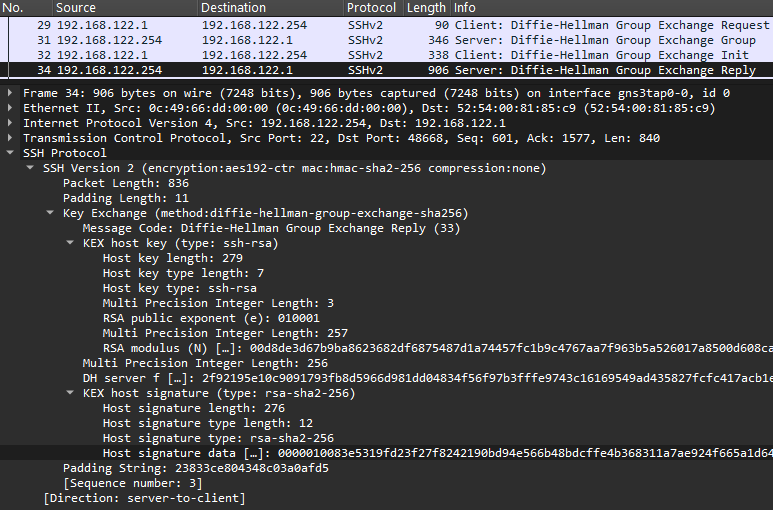
La RFC 8332 décrit l'encodage de la signature :
    The resulting signature is encoded as follows:

    string   "rsa-sha2-256" / "rsa-sha2-512"
    string    rsa_signature_blob

    The value for 'rsa_signature_blob' is encoded as a string that
    contains an octet string S (which is the output of RSASSA-PKCS1-v1_5)
    and that has the same length (in octets) as the RSA modulus.
Le champ rsa_signature_blob est de type string
dont la
RFC 4251
précise l'encodage : la valeur est précédée de sa longueur codée sur 4 octets.
Par conséquent, pour obtenir la valeur de la signature, il faut retirer les 4 premiers octets 0x00000100
qui donnent la taille de la signature, soit 256 octets ici (taille du module \(n\)).
Autrement dit, la valeur de la signature commence par 0x83e5319fd23f27f82421…
Le client vérifie la signature
Nous considérons que le client a déjà accepté la clé publique du serveur dans son fichier known_hosts lors d'une connexion précédente au serveur.
Il vérifie maintenant la signature reçue en appliquant l'opération verify du schéma de signature \(\text{RSASSA-PKCS1-v1\_5}\) (RFC 8017) résumée ci-dessous en pseudocode :
    RSASSA-PKCS1-V1_5-VERIFY ((n, e), M, S)
      s = OS2IP (S)
      em = RSAVP1 ((n, e), s)
      EM = I2OSP (em, k)
      EM_ = EMSA-PKCS1-V1_5-ENCODE (M, k)
      if EM == EM_
        output "valid signature"
      else
        output "invalid signature"
Globalement, cela consiste pour le client à calculer puis comparer \(EM\) et \(EM\_\).
Cette opération prend en entrée :
- la clé publique \((n, e)\) fournie par le serveur (et acceptée par le client)
- le message \(M\) dont il faut vérifier la signature
- la signature \(S\) fournie par le serveur
Chaque partie, le serveur et le client, construit localement et à l'identique le message \(M\), non échangé sur le réseau. La prochaine section le reconstruit côté client.
Le document précise que la signature est codée sur le même nombre d'octets que le module \(n\) :
    S     signature to be verified, an octet string of length k,
          where k is the length in octets of the RSA modulus n
La taille de la clé étant de 2048 bits ici, alors \(k = 256\) octets.
La méthode EMSA-PKCS1-V1_5-ENCODE prendra cette valeur en paramètre d'entrée.
Le client calcule \(EM\)
À ce stade, nous pouvons déjà exécuter les premières instructions de l'opération et calculer \(EM\) :
    def RSAVP1(n: int, e: int, s: int) -> int:
        return pow(s, e, n)  # s^e mod n

    def I2OSP(i: int, i_len: int) -> bytes:
        return int.to_bytes(i, byteorder="big", length=i_len)

    n = 0xd8de3d67b9ba8623682df6875487d1a74457fc1b9c4767aa7f963b5a526017a8500d608ca975d038059e0ef00eb440565b9967c7a267ea5b3c7e200543864afc2ef532c8fca22b487b5adf3d1a9b86479d035923768d9d4cd0014a302cc4bb06567c9e779889f6403d8f7bd767a1802367e2867f5435f2caaee3252e430aa69934b74b0ecdfa89af802e3ee118d978e763f52a1a4e6751102347c21a8b305cd5530e301d16aa1a59e951a9427c45f9573acea6fcb42d0413e418f715293d1edcb16344b76559106a7d036d105b2d497d527fe8fa473b1fc488de277a1267acd6d947c9e2f10337975e13db6dd10f7bf29d8d5f3df7b28c07e27965393fb5c8e3
    e = 0x010001
    s = 0x83e5319fd23f27f8242190bd94e566b48bdcffe4b368311a7ae924f665a1d64e0156310eb3c7545896200003adae9a9b15c65263b21922cb4d98a97818594a43bb6ae0c076bb064031ea47e08b422f671298761e8503488acccc03b75359e03d8c54923167d121a7ff7fa4811d76e4f11a0452a5b9c46d84b78a8dff06ce9579657ebb16c9723907573146ebb4ae6bb32897cb9afa4346768945163a9f8dacbcdf09888960401fc3611e322d9b70ec85261d149858f8450301390b6cfce099fef45932e893081dba707dd918dc2de6c9e1cca9bf57131a10527537954abb41d9bde00e74d660cf919db962f1ce7e23ea1741c74a36f5f4abbe2f4af4b1629634
    k = 256  # taille du module n en octets
    em = RSAVP1(n, e, s)
    EM = I2OSP(em, k)
    print(EM.hex())
L'exécution du script donne :
    0001ffffffffffffffffffffffffffffffffffffffffffffffffffffffffffff
    ffffffffffffffffffffffffffffffffffffffffffffffffffffffffffffffff
    ffffffffffffffffffffffffffffffffffffffffffffffffffffffffffffffff
    ffffffffffffffffffffffffffffffffffffffffffffffffffffffffffffffff
    ffffffffffffffffffffffffffffffffffffffffffffffffffffffffffffffff
    ffffffffffffffffffffffffffffffffffffffffffffffffffffffffffffffff
    ffffffffffffffffffffffff003031300d060960864801650304020105000420
    dceaa744407a7fba4f2ab68e195b7d37500073912a6cdeb4cc241196867a14a7
0xff se répéter est bon signe :
il constitue une caractérisque très révélatrice du schéma de signature \(\text{RSASSA-PKCS1-v1\_5}\) comme la suite le montrera.
Je n'ai pas appelé dans le script la primitive de conversion \(\text{OS2IP}\) sur \(S\) car Python nous permet d'utiliser directement sa forme hexadécimale issue de la capture (comme pour \(n\) et \(e\)). En effet :
    e = 0x010001
    print(e)
    # 65537

    e = 65537
    print(e)
    # 65537
Le client construit \(M\)
Afin de comparer le \(EM\) obtenu à sa version \(EM\_\) calculée, le client construit auparavant la même concaténation d'informations que le serveur :
    The hash H is computed as the HASH hash of the concatenation of the
    following:

      string  V_C, the client's version string (CR and NL excluded)
      string  V_S, the server's version string (CR and NL excluded)
      string  I_C, the payload of the client's SSH_MSG_KEXINIT
      string  I_S, the payload of the server's SSH_MSG_KEXINIT
      string  K_S, the host key
      uint32  min, minimal size in bits of an acceptable group
      uint32  n, preferred size in bits of the group the server will send
      uint32  max, maximal size in bits of an acceptable group
      mpint   p, safe prime
      mpint   g, generator for subgroup
      mpint   e, exchange value sent by the client
      mpint   f, exchange value sent by the server
      mpint   K, the shared secret
Il en calcule le hash, SHA-256 ici du fait de la méthode KEX négociée diffie-hellman-group-exchange-sha256 entre les parties,
ce qui donne le message \(M\).
Si construire cette concaténation d'informations à la main est possible, je me contente ici, pour la simplicité, de récupèrer la valeur depuis Paramiko en modifiant son code source.
Paramiko construit cette concaténation dans la variable hm du fichier kex_gex.py#L259 :
    # okay, build up the hash H of
    # (V_C || V_S || I_C || I_S || K_S || min || n || max || p || g || e || f || K)  # noqa
    hm = Message()
    hm.add(
        self.transport.local_version,
        self.transport.remote_version,
        self.transport.local_kex_init,
        self.transport.remote_kex_init,
        host_key,
    )
    if not self.old_style:
        hm.add_int(self.min_bits)
    hm.add_int(self.preferred_bits)
    if not self.old_style:
        hm.add_int(self.max_bits)
    hm.add_mpint(self.p)
    hm.add_mpint(self.g)
    hm.add_mpint(self.e)
    hm.add_mpint(self.f)
    hm.add_mpint(K)
J'ajoute juste ceci à la fin du code précédent (affichage de hm et calcul du hash SHA-256) :
    print("hm =", bytes(hm).hex())
    H = sha256()
    H.update(bytes(hm))
    print("H =", H.hexdigest())
Ce qui donne à l'exécution :
    hm = 000000165353482d322e302d706172616d696b6f5f342e302e300000000e5353482d322e302d524f53535348000004da14adcc13acfe7eac3ae3cfa6c9f7b579f100000138637572766532353531392d736861323536406c69627373682e6f72672c656364682d736861322d6e697374703235362c656364682d736861322d6e697374703338342c656364682d736861322d6e697374703532312c6469666669652d68656c6c6d616e2d67726f757031362d7368613531322c6469666669652d68656c6c6d616e2d67726f75702d65786368616e67652d7368613235362c6469666669652d68656c6c6d616e2d67726f757031342d7368613235362c6469666669652d68656c6c6d616e2d67726f75702d65786368616e67652d736861312c6469666669652d68656c6c6d616e2d67726f757031342d736861312c6469666669652d68656c6c6d616e2d67726f7570312d736861312c6578742d696e666f2d632c6b65782d7374726963742d632d763030406f70656e7373682e636f6d000001667373682d7273612c7373682d656432353531392c65636473612d736861322d6e697374703235362c65636473612d736861322d6e697374703338342c65636473612d736861322d6e697374703532312c7273612d736861322d3531322c7273612d736861322d3235362c7373682d7273612d636572742d763031406f70656e7373682e636f6d2c7373682d656432353531392d636572742d763031406f70656e7373682e636f6d2c65636473612d736861322d6e697374703235362d636572742d763031406f70656e7373682e636f6d2c65636473612d736861322d6e697374703338342d636572742d763031406f70656e7373682e636f6d2c65636473612d736861322d6e697374703532312d636572742d763031406f70656e7373682e636f6d2c7273612d736861322d3531322d636572742d763031406f70656e7373682e636f6d2c7273612d736861322d3235362d636572742d763031406f70656e7373682e636f6d000000786165733132382d6374722c6165733139322d6374722c6165733235362d6374722c6165733132382d6362632c6165733139322d6362632c6165733235362d6362632c336465732d6362632c6165733132382d67636d406f70656e7373682e636f6d2c6165733235362d67636d406f70656e7373682e636f6d000000786165733132382d6374722c6165733139322d6374722c6165733235362d6374722c6165733132382d6362632c6165733139322d6362632c6165733235362d6362632c336465732d6362632c6165733132382d67636d406f70656e7373682e636f6d2c6165733235362d67636d406f70656e7373682e636f6d00000083686d61632d736861322d3235362c686d61632d736861322d3531322c686d61632d736861322d3235362d65746d406f70656e7373682e636f6d2c686d61632d736861322d3531322d65746d406f70656e7373682e636f6d2c686d61632d736861312c686d61632d6d64352c686d61632d736861312d39362c686d61632d6d64352d393600000083686d61632d736861322d3235362c686d61632d736861322d3531322c686d61632d736861322d3235362d65746d406f70656e7373682e636f6d2c686d61632d736861322d3531322d65746d406f70656e7373682e636f6d2c686d61632d736861312c686d61632d6d64352c686d61632d736861312d39362c686d61632d6d64352d3936000000046e6f6e65000000046e6f6e650000000000000000000000000000000121143197c608807b71835bd56af6980ae19a00000041637572766532353531392d7368613235362c6469666669652d68656c6c6d616e2d67726f75702d65786368616e67652d7368613235362c6578742d696e666f2d730000000c7273612d736861322d3235360000002c6165733139322d6374722c6165733235362d6374722c6165733235362d67636d406f70656e7373682e636f6d0000002c6165733139322d6374722c6165733235362d6374722c6165733235362d67636d406f70656e7373682e636f6d0000001b686d61632d736861322d3235362c686d61632d736861322d3531320000001b686d61632d736861322d3235362c686d61632d736861322d353132000000046e6f6e65000000046e6f6e650000000000000000000000000000000117000000077373682d727361000000030100010000010100d8de3d67b9ba8623682df6875487d1a74457fc1b9c4767aa7f963b5a526017a8500d608ca975d038059e0ef00eb440565b9967c7a267ea5b3c7e200543864afc2ef532c8fca22b487b5adf3d1a9b86479d035923768d9d4cd0014a302cc4bb06567c9e779889f6403d8f7bd767a1802367e2867f5435f2caaee3252e430aa69934b74b0ecdfa89af802e3ee118d978e763f52a1a4e6751102347c21a8b305cd5530e301d16aa1a59e951a9427c45f9573acea6fcb42d0413e418f715293d1edcb16344b76559106a7d036d105b2d497d527fe8fa473b1fc488de277a1267acd6d947c9e2f10337975e13db6dd10f7bf29d8d5f3df7b28c07e27965393fb5c8e3000004000000080000002000000001010083da238b86f5b7f7477bcb1b22d1f5291d36678ad75764a8e6f4fd90e0efa544875a7fafe00a1b6abbadb4f34ae807f79e2a760ec6823d608a88d3e61a8ee0610f0c55a5c87183f02e69f9e21819c36eaf4fbfc2d5c7f42f2bee05d9745391e90e1f97857d97579a2b0e88c17fdfa6c49ab9fb6c17d459e0aa20bdff79a5266619694bf87b5eab2f6e80fd5a7036bdac0caf5d01357324612e8503ffa4b3bb616b20d074f0e07932c12dab03f22cd81c58384106f25d4dca608b42b98a2aae8cfcd96124d1baa4afc5a50113055019c1a294b300855ccf25af3b256bb8307730beb41b14226622eadff97d984cd9cef29c0feddc1fbcdae2db57df0d5cfe2afb00000001020000010009af968bad12a5ada074cdede0f67f5f851b34ec7ae07de86b6cb3e15e933439188ad1eb9d14ae626e1ca2ed412a931d6c163258093245a06fdd54f4739f2ba77a29bbb228bab7f8c7ec8dab7099efe9a67c2e951d40d7b6c6830bad02ab88138fe8f9aba53d40d5c62e292ebdca15975a24b094f31b5508ad389eca14cb47ec4506a77e9003767a027517f78035cc14e2dcdc3986bdd7966f94a51885550c9edcacd4441bd7b52497a3077bb822db3d5544df51116dde353c356d7bddcfc9f277d065f907a71415d031faaee7b9bf7d72bd8ba1bff6142d6f2b4338a8bf2bf88922fa974d521248339190897bf2eeb837685fc7b3cd5ccaf0eff03f0b687a4f000001002f92195e10c9091793fb8d5966d981dd04834f56f97b3fffe9743c16169549ad435827fcfc417acb1e83d7235566bdbf88931ea6a328b07a7b1cd133364f11a0c40dd96f03bc6b11aef79034ba486471851bcdd363aa7955c7e5e8a56933eaea42eef3a0ad3edb5b9741f442e5685c3a1cceac96de9a787468519287cabcbba789322ca81f706f35d4ff41663d3d654b3c84123cd3577a44d7a95f84e2b34cc49cc6a7fc11028fdc3b89fc81bd8116f7803fd0e23c1947fe0a7264c6d4c43ef7d81ab1fab07086a12a833dfdb6df37680ab8092915f84fe44731ce391a6121132d04dbc217e5b42e5c65d6b3caceda509991bc30431244b16490eb0a59661903000001003a4b1090cd0ad0cb0e0de162ebbf47c416027a07071ccb3e2e660501a7f064c5e1b498ac9cae44e2e724ff6b15a4346d56f112eea915083eb0a47d9b8ac5dec720eb509503bf4b0e8aaeec7336c4a2ca9aa36fba251cb7162cf49da2ae37489cf364d454e000c7f7a3ed0fffd7aa4e3d9e0ced8555402e8837ce15f92a5706689c8f69d0a63cb79743f87c137f4fa6035995ef47c3129ade63de980d94c5dc7561a0aa9f66971978afb37c67bdf974f26d3115cd87907815139e902ac6a699cded4dcba460241d61d5959ceebefde2e72e4d29e441b405a1c6cede7fb1c09a3bed68f3631ad31f18dc0d7aa7353dffa117087b7d0898742d48aac68622a5118a
    H = e80d640db43aeb7515cf67a0103e71f2b68bef48c203e2f5a034da84d2a3083d
Pour la curiosité, décodons le début de hm dont les premiers champs sont :
    string  V_C, the client's version string (CR and NL excluded)
    string  V_S, the server's version string (CR and NL excluded)
hm est encodée selon un format binaire qui correspond à la concaténation d'informations donnée plus haut.
Pour rappel, la
RFC 4251
précise l'encodage du type string : la valeur est précédée de sa longueur codée sur 4 octets.
Ce qui donne :
    print(0x00000016, "octets vont suivre")
    # 22 octets vont suivre

    print(bytes.fromhex("5353482d322e302d706172616d696b6f5f342e302e30"))
    # b'SSH-2.0-paramiko_4.0.0'

    print(0x0000000e, "octets vont suivre")
    # 14 octets vont suivre

    print(bytes.fromhex("5353482d322e302d524f53535348"))
    # b'SSH-2.0-ROSSSH'
Et ainsi de suite pour les autres champs.
Le client calcule \(EM\_\)
Le client exécute maintenant la méthode EMSA-PKCS1-V1_5-ENCODE
pour calculer \(EM\_\) :
    EMSA-PKCS1-v1_5-ENCODE (M, emLen)

    Option:

       Hash     hash function (hLen denotes the length in octets of
                the hash function output)

    Input:

       M        message to be encoded
       emLen    intended length in octets of the encoded message, at
                least tLen + 11, where tLen is the octet length of the
                Distinguished Encoding Rules (DER) encoding T of
                a certain value computed during the encoding operation

     Output:

       EM       encoded message, an octet string of length emLen
La fonction hash sera SHA-256 du fait de l'algorithme d'authentification rsa-sha2-256 négocié.
diffie-hellman-group-exchange-sha256 entre les parties.
D'ailleurs, quand l'algorithme d'authentification plus ancien ssh-rsa, déprécié par OpenSSH,
est utilisé, la fonction SHA-1 s'applique ici, alors que la fonction SHA-256 s'applique dans l'étape de la section précédente.
Les paramètres d'entrée sont :
- le message \(M\)—correspond ici au hash de la concaténation d'informations précédente
- la taille attendue de \(EM\)—positionnée par l'appelant à 256 octets (taille du module \(n\))
Nous appliquons ensuite ci-dessous rigoureusement les étapes de la RFC 8017 :
    1.  Apply the hash function to the message M to produce a hash
      value H:

         H = Hash(M).
Le client applique donc, de nouveau, un hash SHA-256 sur \(M\) :
    from hashlib import sha256
    H = sha256()
    H.update(bytes.fromhex("e80d640db43aeb7515cf67a0103e71f2b68bef48c203e2f5a034da84d2a3083d"))
    print(H.hexdigest())
    # dceaa744407a7fba4f2ab68e195b7d37500073912a6cdeb4cc241196867a14a7
Ensuite, il combine plusieurs informations selon une syntaxe ASN.1 encodée en DER, chose fréquente dans le domaine de la cryptographie comme le dit la RFC 6025 : « Abstract Syntax Notation One (ASN.1) is widely used throughout the IETF Security Area and has been for many years. »
    2.  Encode the algorithm ID for the hash function and the hash
        value into an ASN.1 value of type DigestInfo (see
        Appendix A.2.4) with the DER, where the type DigestInfo has
        the syntax

             DigestInfo ::= SEQUENCE {
                 digestAlgorithm AlgorithmIdentifier,
                 digest OCTET STRING
             }

        The first field identifies the hash function and the second
        contains the hash value.  Let T be the DER encoding of the
        DigestInfo value (see the notes below), and let tLen be the
        length in octets of T.
La RFC nous mâche le travail et donne l'encodage associé au hash SHA-256 :
SHA-256: (0x)30 31 30 0d 06 09 60 86 48 01 65 03 04 02 01 05 00 04 20 || H.
La construction de T donne :
    H = "dceaa744407a7fba4f2ab68e195b7d37500073912a6cdeb4cc241196867a14a7"
    T = "3031300d060960864801650304020105000420" + H
    print(T)
    # T = 3031300d060960864801650304020105000420dceaa744407a7fba4f2ab68e195b7d37500073912a6cdeb4cc241196867a14a7
L'étape 3 consiste juste à vérifier une condition :
3. If emLen < tLen + 11, output "intended encoded message length too short" and stop.
emLen valant 256 octets et tLen, la longueur de T, valant 52 octets, la condition est respectée :
    emLen = 256
    tLen = 52

    print(emLen < (tLen + 11))
    # False
La quatrième étape correspond à la répétition du fameux motif 0xff,
caractéristique inhérente au schéma de signature \(\text{RSASSA-PKCS1-v1\_5}\) :
    4.  Generate an octet string PS consisting of emLen - tLen - 3
        octets with hexadecimal value 0xff.  The length of PS will be
        at least 8 octets.
Le motif se répète ici \(256 - 52 - 3 = 201\) fois :
    emLen = 256
    tLen = 52
    PS = "ff" * int(emLen - tLen - 3)
    print(PS)
    # ffffffffffffffffffffffffffffffffffffffffffffffffffffffffffffffffffffffffffffffffffffffffffffffffffffffffffffffffffffffffffffffffffffffffffffffffffffffffffffffffffffffffffffffffffffffffffffffffffffffffffffffffffffffffffffffffffffffffffffffffffffffffffffffffffffffffffffffffffffffffffffffffffffffffffffffffffffffffffffffffffffffffffffffffffffffffffffffffffffffffffffffffffffffffffffffffffffffffffffffffff
Enfin, la cinquième et dernière étape construit \(EM\) :
    5.  Concatenate PS, the DER encoding T, and other padding to form
        the encoded message EM as

           EM = 0x00 || 0x01 || PS || 0x00 || T.
Soit, si je reprends tous les éléments précédents :
    H = "dceaa744407a7fba4f2ab68e195b7d37500073912a6cdeb4cc241196867a14a7"
    T = "3031300d060960864801650304020105000420" + H
    emLen = 256
    tLen = len(T) / 2
    PS = "ff" * int(emLen - tLen - 3)
    EM = "00" + "01" + PS + "00" + T
    print(EM)
    # 0001ffffffffffffffffffffffffffffffffffffffffffffffffffffffffffff
    # ffffffffffffffffffffffffffffffffffffffffffffffffffffffffffffffff
    # ffffffffffffffffffffffffffffffffffffffffffffffffffffffffffffffff
    # ffffffffffffffffffffffffffffffffffffffffffffffffffffffffffffffff
    # ffffffffffffffffffffffffffffffffffffffffffffffffffffffffffffffff
    # ffffffffffffffffffffffffffffffffffffffffffffffffffffffffffffffff
    # ffffffffffffffffffffffff003031300d060960864801650304020105000420
    # dceaa744407a7fba4f2ab68e195b7d37500073912a6cdeb4cc241196867a14a7
Comparaison de \(EM\) et \(EM\_\)
La valeur précédente est retournée à l'appelant RSASSA-PKCS1-V1_5-VERIFY dans la variable \(EM\_\) qui procède à la comparaison avec \(EM\).
Si j'assemble les différents bouts de code :
    from hashlib import sha256

    def RSAVP1(n: int, e: int, s: int) -> int:
        return pow(s, e, n)  # s^e mod n

    def I2OSP(i: int, i_len: int) -> bytes:
        return int.to_bytes(i, byteorder="big", length=i_len)

    # fonctionne seulement pour l'algorithme "rsa-sha2-256"
    def EMSA_PKCS1_V1_5_ENCODE(M: bytes, emLen: int) -> bytes:
        # étape 1
        H = sha256()
        H.update(M)
        # étape 2
        T = "3031300d060960864801650304020105000420" + H.hexdigest()
        tLen = len(T) / 2
        # étape 3
        if emLen < (tLen + 11):
            raise ValueError("intended encoded message length too short")
        # étape 4
        PS = "ff" * int(emLen - tLen - 3)
        # étape 5
        EM = "00" + "01" + PS + "00" + T
        # étape 6
        return bytes.fromhex(EM)

    # calcul de EM
    n = 0xd8de3d67b9ba8623682df6875487d1a74457fc1b9c4767aa7f963b5a526017a8500d608ca975d038059e0ef00eb440565b9967c7a267ea5b3c7e200543864afc2ef532c8fca22b487b5adf3d1a9b86479d035923768d9d4cd0014a302cc4bb06567c9e779889f6403d8f7bd767a1802367e2867f5435f2caaee3252e430aa69934b74b0ecdfa89af802e3ee118d978e763f52a1a4e6751102347c21a8b305cd5530e301d16aa1a59e951a9427c45f9573acea6fcb42d0413e418f715293d1edcb16344b76559106a7d036d105b2d497d527fe8fa473b1fc488de277a1267acd6d947c9e2f10337975e13db6dd10f7bf29d8d5f3df7b28c07e27965393fb5c8e3
    e = 0x010001
    s = 0x83e5319fd23f27f8242190bd94e566b48bdcffe4b368311a7ae924f665a1d64e0156310eb3c7545896200003adae9a9b15c65263b21922cb4d98a97818594a43bb6ae0c076bb064031ea47e08b422f671298761e8503488acccc03b75359e03d8c54923167d121a7ff7fa4811d76e4f11a0452a5b9c46d84b78a8dff06ce9579657ebb16c9723907573146ebb4ae6bb32897cb9afa4346768945163a9f8dacbcdf09888960401fc3611e322d9b70ec85261d149858f8450301390b6cfce099fef45932e893081dba707dd918dc2de6c9e1cca9bf57131a10527537954abb41d9bde00e74d660cf919db962f1ce7e23ea1741c74a36f5f4abbe2f4af4b1629634
    k = 256  # taille du module n en octets
    em = RSAVP1(n, e, s)
    EM = I2OSP(em, k)

    # calcul de EM_
    EM_ = EMSA_PKCS1_V1_5_ENCODE(
        M=bytes.fromhex("e80d640db43aeb7515cf67a0103e71f2b68bef48c203e2f5a034da84d2a3083d"),
        emLen=k
    )

    # comparaison de EM et EM_
    if EM == EM_:
        print("valid signature")
    else:
        print("invalid signature")
Résultat à l'exécution :
valid signature
La signature étant vérifiée, le client considère réussie l'authentification du serveur.
Reproduire ces constructions et calculs à la main donne une idée des implémentations sous-jacentes et démystifie le fonctionnement, concret, de la signature-based authentication.
Authentification du client auprès du serveur
Le client fournit sa clé publique et la signature
Le client fournit sa clé publique et la signature dans un même paquet MSG_USERAUTH_REQUEST,
non visible en clair sur une capture car, une fois l'authentification du serveur auprès du client réussie, le trafic se veut chiffré.
Alors je modifie le code source de Paramiko pour afficher la signature envoyée au serveur, la signature portant, de nouveau, sur une combinaison d'informations liées à la session :
    The value of 'signature' is a signature by the corresponding private
    key over the following data, in the following order:

      string    session identifier
      byte      SSH_MSG_USERAUTH_REQUEST
      string    user name
      string    service name
      string    "publickey"
      boolean   TRUE
      string    public key algorithm name
      string    public key to be used for authentication
Paramiko construit cette combinaison d'informations dans auth_handler.py#L187 :
    def _get_session_blob(self, key, service, username, algorithm):
        m = Message()
        m.add_string(self.transport.session_id)
        m.add_byte(cMSG_USERAUTH_REQUEST)
        m.add_string(username)
        m.add_string(service)
        m.add_string("publickey")
        m.add_boolean(True)
        _, bits = self._get_key_type_and_bits(key)
        m.add_string(algorithm)
        m.add_string(bits)
        return m.asbytes()
Le paquet MSG_USERAUTH_REQUEST est lui construit dans auth_handler.py#L327 :
    m = Message()
    m.add_byte(cMSG_USERAUTH_REQUEST)
    m.add_string(self.username)
    m.add_string("ssh-connection")
    m.add_string(self.auth_method)
    # …
    elif self.auth_method == "publickey":
        m.add_boolean(True)
        key_type, bits = self._get_key_type_and_bits(self.private_key)
        algorithm = self._finalize_pubkey_algorithm(key_type)
        m.add_string(algorithm)
        m.add_string(bits)
        blob = self._get_session_blob(
            self.private_key,
            "ssh-connection",
            self.username,
            algorithm,
        )
        sig = self.private_key.sign_ssh_data(blob, algorithm)
        m.add_string(sig)

        # modification du code source
        print("Auth algorithm sent is:", algorithm)
        print("Public key sent is:", bytes(bits).hex())
        print("Signature sent is:", bytes(sig).hex())
Je rajoute juste à la fin plusieurs print pour afficher les informations envoyées au serveur.
    Auth algorithm sent is: rsa-sha2-256
    Public key sent is: 000000077373682d727361000000030100010000010100e1650e792269f2a6243e933e8e5f2429fe43ea0521653f6222a274ef4701ac6c3b6a5ea482d65c5da1c9acafe218726aaa7e135b78afd6c960e65b137a3c3c37ffcf0aef1b6b2d78445e855cdc0facce3fd8f991a392b66686e2d029f495a8b5e0cdc65a4d36763b84541ec7fbcdc825e2f76928f47fb6f0cc730ee6561a432669c3d7ac8d7038f2ee5714d78d1d7f6b6312cb866f7471a36b7ad359c726e58712405151789d89aa9af6f801ce4c0670452f1db430bb522b3d3776fec612e13a5a308629ace809010e113e0d745471b654943c21d1c657cc01090ee75f3fc6a28e84bf3f822b2ce09f58c69d3be9905e38b6435cfaee95f5cbd1523a809cf675
    Signature sent is: 0000000c7273612d736861322d323536000001006d3d06d9b3ebe961111f69c8e8ff727311b9d03bcf5ca8b31bbca18a85c28895dcb0e3c474d01aecc620af5a9299418b545a6479724272a6f9b5095cb35e8481d302c61147dfbe9f804d5720230b1e62f73eaa643bb0f133badd6a21c2d6ab6b4dee90d70edd0c1385f0521c215889ad574c3e9b43f8f27a527a128eb2b1d1d1a18f5818217bb2d91e84914befaed19fe48abb4f98e0fce9f610cbab577bf27e3c91c69be0178c58df92d6dce0d6ddf287dce68c1ff48bc0105706410750a36fb572c462d41a88e3e919f77c1e0d46fedc28e4f839e43882bb384cbdb2bdbde2d4257147e733802f7c25648a63c69d32bebc1c48e955b1307f121f63c4dfea03
La clé publique est encodée conformément à la RFC 4253 :
    The "ssh-rsa" key format has the following specific encoding:

       string    "ssh-rsa"
       mpint     e
       mpint     n
Aussi, pour récupérer la valeur de \(n\),
il faut enlever les octets correspondant au type de clé ssh-rsa et à l'exposant \(e\) :
    00 00 00 07           # 7 octets vont suivre (nombre exprimé lui-même sur 4 octets)
    73 73 68 2d 72 73 61  # codage ASCII de "ssh-rsa" sur 7 octets

    00 00 00 03           # 3 octets vont suivre
    01 00 01              # valeur de e en hexadécimal sur 3 octets

    00 00 01 01           # 257 octets vont suivre
    00                    # 1 octet pour le signe positif de n car son premier bit ne vaut pas 0

    # valeur de n en hexadécimal sur 256 octets
    e1650e792269f2a6243e93…
De même, la signature est encodée conformément à la RFC 8332 :
    The resulting signature is encoded as follows:

    string   "rsa-sha2-256" / "rsa-sha2-512"
    string    rsa_signature_blob
Aussi, pour récupérer la valeur de la signature, il faut enlever les octets correspondant à l'algorithme rsa-sha2-256 :
    00 00 00 0c                         # 12 octets vont suivre
    72 73 61 2d 73 68 61 32 2d 32 35 36 # codage ASCII de "rsa-sha2-256" sur 12 octets

    00 00 01 00                         # 256 octets vont suivre

    # valeur de la signature en hexadécimal sur 256 octets
    6d3d06d9b3ebe961111f69…
Le serveur vérifie la signature
Nous considérons que le serveur a autorisé la clé publique du client dans son fichier authorized_keys.
Il vérifie maintenant la signature reçue en appliquant l'opération VERIFY du schéma de signature \(\text{RSASSA-PKCS1-v1\_5}\).
L'exécution des premières instructions donne \(EM\) :
    def RSAVP1(n: int, e: int, s: int) -> int:
        return pow(s, e, n)  # s^e mod n

    def I2OSP(i: int, k: int) -> bytes:
        return int.to_bytes(i, byteorder="big", length=k)

    n = 0xe1650e792269f2a6243e933e8e5f2429fe43ea0521653f6222a274ef4701ac6c3b6a5ea482d65c5da1c9acafe218726aaa7e135b78afd6c960e65b137a3c3c37ffcf0aef1b6b2d78445e855cdc0facce3fd8f991a392b66686e2d029f495a8b5e0cdc65a4d36763b84541ec7fbcdc825e2f76928f47fb6f0cc730ee6561a432669c3d7ac8d7038f2ee5714d78d1d7f6b6312cb866f7471a36b7ad359c726e58712405151789d89aa9af6f801ce4c0670452f1db430bb522b3d3776fec612e13a5a308629ace809010e113e0d745471b654943c21d1c657cc01090ee75f3fc6a28e84bf3f822b2ce09f58c69d3be9905e38b6435cfaee95f5cbd1523a809cf675
    e = 0x010001
    s = 0x6d3d06d9b3ebe961111f69c8e8ff727311b9d03bcf5ca8b31bbca18a85c28895dcb0e3c474d01aecc620af5a9299418b545a6479724272a6f9b5095cb35e8481d302c61147dfbe9f804d5720230b1e62f73eaa643bb0f133badd6a21c2d6ab6b4dee90d70edd0c1385f0521c215889ad574c3e9b43f8f27a527a128eb2b1d1d1a18f5818217bb2d91e84914befaed19fe48abb4f98e0fce9f610cbab577bf27e3c91c69be0178c58df92d6dce0d6ddf287dce68c1ff48bc0105706410750a36fb572c462d41a88e3e919f77c1e0d46fedc28e4f839e43882bb384cbdb2bdbde2d4257147e733802f7c25648a63c69d32bebc1c48e955b1307f121f63c4dfea03
    k = 256  # taille du module n en octets
    em = RSAVP1(n, e, s)
    EM = I2OSP(em, k)
    print(EM.hex())
    # 0001ffffffffffffffffffffffffffffffffffffffffffffffffffffffffffff
    # ffffffffffffffffffffffffffffffffffffffffffffffffffffffffffffffff
    # ffffffffffffffffffffffffffffffffffffffffffffffffffffffffffffffff
    # ffffffffffffffffffffffffffffffffffffffffffffffffffffffffffffffff
    # ffffffffffffffffffffffffffffffffffffffffffffffffffffffffffffffff
    # ffffffffffffffffffffffffffffffffffffffffffffffffffffffffffffffff
    # ffffffffffffffffffffffff003031300d060960864801650304020105000420
    # 16b2a6f6a002758223443bb464f2cde7cd1950b8640eee07722a35d8668f86a4
Le serveur retrouve le motif 0xff, caractéristique du schéma de signature \(\text{RSASSA-PKCS1-v1\_5}\).
Je n'irai pas plus loin dans l'exercice, la suite étant similaire à la section précédente, c'est-à-dire l'authentification du serveur auprès du client :
- le serveur construit la même combinaison d'informations (sur lequel il applique la même fonction hash) et y applique la méthode d'encodage
EMSA-PKCS1-v1_5-ENCODE - il retrouvera le même \(EM\) que celui calculé ci-dessus
- et considèrera alors réussie l'authentification du client